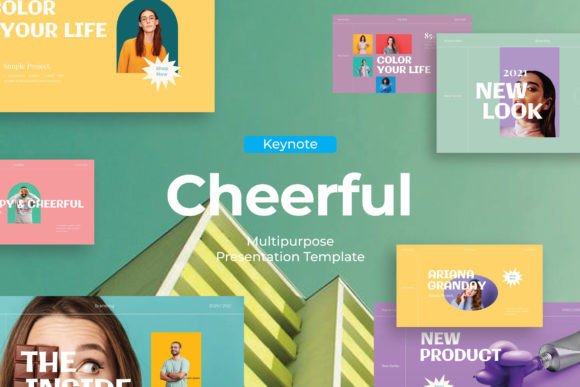
Chreeful - Keynote Template: Modern Slides for Impactful Presentations
Capturing and holding your audience's attention during a presentation is a common challenge. Whether you're pitching a startup, showcasing a portfolio, or outlining a marketing strategy, the visual foundation of your talk matters. The Chreeful - Keynote Template is designed as a multipurpose solution, offering a professional and modern framework to present your business, creative ideas, or educational content. It’s a set of design assets built to help you communicate more effectively.
A Clean Canvas for Your Message
At its core, Chreeful provides a clean, contemporary aesthetic. The slides utilize ample white space, balanced layouts, and a focus on clarity. This isn't about flashy animations or overwhelming graphics; it's about creating a professional presentation where your content is the hero. The visual personality is versatile—confident enough for a corporate quarterly review yet flexible enough for a creative agency's case study. This adaptability makes it a practical tool for brand identity consistency, allowing you to present your brand's story cohesively across different contexts.
The template includes 30+ total slides, giving you a robust library to structure your narrative. From title slides and team introductions to data-driven charts and portfolio showcases, the variety supports a comprehensive story arc. A key practical feature is the picture placeholder and drag and drop image functionality. This means you can quickly insert your own high-quality visuals—product shots, team photos, or infographics—without wrestling with complex formatting. It streamlines the process of making the presentation truly yours.
Practical Applications Across Industries
Where does a template like Chreeful find its best use? Its strength lies in its multipurpose nature. For entrepreneurs and startup founders, it's ideal for investor pitches and business plan presentations. The professionally designed slides lend credibility, helping to build trust from the first slide. Marketers and content creators can leverage it for campaign briefs, social media strategy presentations, or influencer media kits, using the vector based icons to illustrate concepts without needing custom graphics.
For designers and agencies, it serves as an excellent starting point for client presentations. You can easily change colors to match a client's brand palette, ensuring the deliverable feels tailored and thoughtful. The use of recommended free web fonts also simplifies the process, as you won't need to hunt for or license additional typefaces. Educators and trainers can create engaging lecture materials, while small business owners can develop clear pitches for partnerships or funding. Even bloggers and publishers might use it to present editorial guidelines or content strategy to contributors or sponsors.
Design Decisions That Support Your Goals
Choosing a presentation template is a design decision that influences visual hierarchy and audience engagement. A cluttered slide deck can confuse viewers, while a well-organized one guides their attention. Chreeful's structure encourages a logical flow. The consistent use of typography and layout creates professionalism and makes your content easier to follow. This consistency is a cornerstone of effective brand perception; when every slide looks like it belongs to the same family, your message feels more unified and credible.
When evaluating this or any template, consider your specific content. Does the template's style align with your brand's personality? Are the slide layouts suitable for the type of information you need to present—lots of text, data visualizations, or full-bleed images? Test the easy color change feature. Can you quickly adapt it to your brand's primary and secondary colors? Also, review the included icon set. While the template includes vector based icons, ensure they complement rather than clash with your existing visual language.
Getting the Most From Your Template
To use Chreeful effectively, start with your content outline, not the slides. Write your key points first, then select the slides that best frame each section. This prevents you from forcing content into a pre-designed box. When adding images, use high-resolution photos. The picture placeholder feature makes this easy, but the quality of your visuals will ultimately determine the impact.
Remember, the template is a tool, not a final product. Your unique perspective, data, and story are what will resonate. Use the modern typography and clean lines as a stage for your narrative. The fact that images are not included is actually an advantage—it pushes you to source or create visuals that are directly relevant to your message, avoiding generic stock photos that can dilute your authenticity.
In a world saturated with presentations, a thoughtful, well-designed deck can be a significant differentiator. The Chreeful - Keynote Template provides a solid, professional foundation. By focusing on clear communication and leveraging its flexible features, you can create presentations that not only look good but also help you achieve your specific goals, whether that's securing investment, winning a client, or educating your team.